
In short
To explore a city without a guide, all you need is a smartphone, earphones and an audio tour app. An app that generates the tour in real time, like Guidly, tells the story of every place around you, in your language and based on your interests, and answers your questions. Bring a connection (data plan or eSIM) and a power bank.
Contents
Booking a guide means following a group, a schedule and a set route. Wandering on your own means walking past façades, squares and churches without knowing their story. In between, there’s your phone: with the right app, it becomes a personal guide that goes wherever you go, whenever you want.
Here’s how to explore a city without a guide, from planning to walking, and how to choose your audio tour app.
Why explore a city without a guide?
- At your own pace: spend twenty minutes at a cathedral or move on, without waiting for the group.
- On your terms: architecture rather than battle dates, anecdotes rather than lists of kings.
- In your language: no more hunting for a tour in English, or following commentary you only half understand.
- No booking: head out whenever you like, including in the evening or on a whim.
- For less: a private tour often costs more than €100, an app a few euros a day.
Before you go: 4 things to prepare
- An audio tour app, installed and tested at home (see below for how to choose one).
- An internet connection: check your roaming allowance before you leave, or get a local eSIM, which costs a few euros and takes minutes to set up.
- Earphones: ideally ones that let street sounds through (a single earbud, or bone-conduction headphones), so you stay aware of traffic.
- A power bank: location and audio drain your battery quickly over a full day.
On the ground: how it works
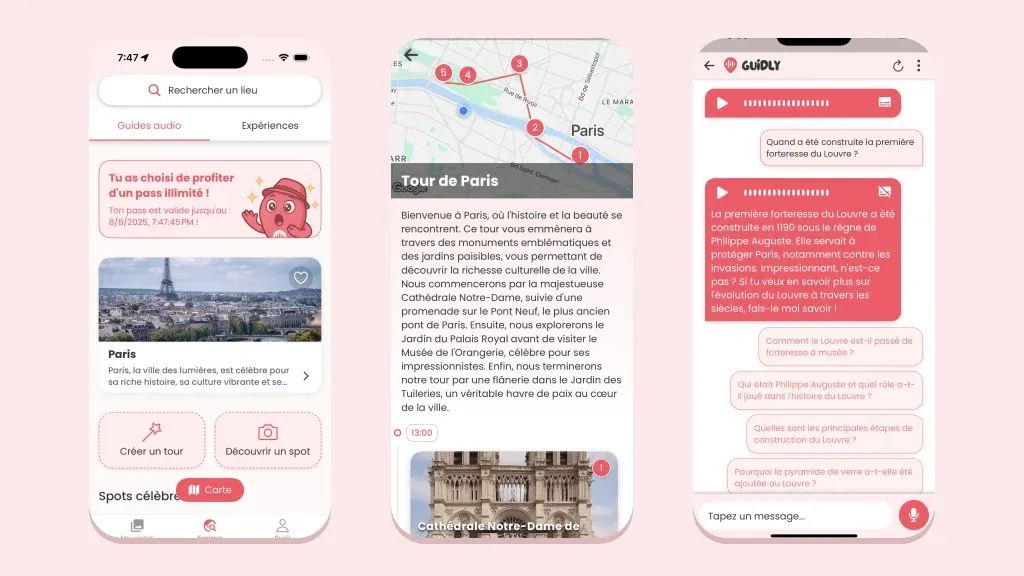
With Guidly, a tour takes three steps:
- Open the map: the app detects the places around you, from famous landmarks to the small neighbourhood church. Our own database holds 9 million points of interest in more than 190 countries.
- Start the audio: Guidly generates the tour in real time, based on your interests, the tone and the level of detail you chose, in any of its 12+ languages.
- Ask your questions, typed or spoken: why is this façade crooked? Who lived here? The guide answers, just like a private guide would.
A few handy extras:
- Create your own tour by linking the places you care about.
- Save favourites to come back to later.
- Kids mode for ages 3–8, with words and pacing to match: the whole family can follow along.
The download is free, and a 1-day, 3-day or 1-week pass unlocks every tour, with no subscription.
Which audio tour app should you choose?
Audio tour apps don’t all work the same way. They fall into four families:
| Type of app | Content | Offline | Best for |
|---|---|---|---|
| Real-time generated tours (Guidly) | Unique audio for every place, shaped by your interests and language, with questions | No, needs a connection | A guide for any place |
| Free tour library | Audio guides published by museums, tourist offices or individuals | Yes, download beforehand | Tight budgets, museums |
| City guide | Content prepared for major destinations | Often a paid option | Major tourist cities |
| Storytelling walk | Route written and recorded by a narrator, paid per tour | Yes | Fans of crafted storytelling |
To decide:
- In a major capital, they all have content. In a small town, a village or a less touristy country such as Albania, only an app that generates a tour for any place covers everything.
- With no connection at all, you’ll need to download pre-recorded routes before you leave, with a fixed itinerary.
- If you want to ask questions or stop wherever you like, choose an app that generates the tour.
What about traditional audio guides?
The audio guide you rent at a museum entrance is still a good option indoors: the commentary is official and accurate. But it only covers that one place, in the languages provided, and you often pay for it on top of your ticket. Your app takes over as soon as you step back into the street.
For some major sites, a tour with a licensed guide is still hard to beat: it sometimes gets you into places closed to the public.
Our tips for a great tour
- Don’t over-plan: three or four neighbourhoods a day is plenty. Getting a little lost is part of the fun.
- Start early: landmarks are quieter in the morning, and the light is better for photos.
- Alternate listening and looking: pause the audio to take in what you’ve just heard about.
- Keep an eye on traffic: it’s easy to get absorbed in a story while crossing the street.
Looking for destination ideas? See our pick of the most beautiful European capitals, itineraries like Paris in 3 days, or our solo weekend ideas for women.
FAQ
How do I take a guided tour with my phone?
Download an audio tour app, allow location access and put your earphones in. With Guidly, just open the map: the app detects the places around you and tells you their story, in your language.
What is the best audio tour app?
It depends on your trip. To explore any place, in your language, based on your interests and with your questions answered, choose an app that generates the tour in real time, like Guidly. On a zero budget, a free tour library can help in big cities and museums.
Is there a free audio tour app?
Yes, some audio guide libraries are free, usually with ads and uneven quality. Guidly is free to download; a 1-day, 3-day or 1-week pass then unlocks every tour, with no subscription.
What is the difference between an audio tour app and a traditional audio guide?
A traditional audio guide plays the same recorded commentary to everyone, for a single place, often on a rented handset. An app like Guidly generates a unique commentary for every place around you, based on your interests, your language and the level of detail you choose, and answers your questions.